- You are not in a vacuum
- Err on the side of caution; Respond swiftly
- Be prudent; Accept responsibility
- Update your tactics
- Context matters
- If you apologize, mean it
- Mocking your customers = bad
- Be transparent
- Manage your social media presence (or someone may manage it for you)
- Sometimes you are the problem

Monday, June 13, 2011
#Fail: Social Media #PR Disasters - recap
Thanks to Stephanie Scott and Corey Lark for sharing their 10 Lessons from Social Media PR Disasters for the June Ft. Worth PRSA luncheon: (Get their presentation slide deck.)
Thursday, June 2, 2011
8 Takeaways from the DFW Nonprofit Communicators Conference

The sessions that interested me the most were on social media policies/guidelines and crisis communications. (I suppose being in school public relations, I'd gravitate to these two areas of concern since knowledge in these areas is often needed.)
Below are 8 key takeaways from these two sessions:
Legal Policies for Social Media Communicators
presented by Whitney Presley, Sr. Director of Digital Communications, American Heart Association
- There's a difference between social media policies and guidelines: policies protect the organization and employee while guidelines should give the rules for how to behave.
- Create commenting/posting disclaimer for networks and define difference between personal/professional use of social media and social networks for the organization's perspective.
- Check the Social Media Governance website for examples of corporate and nonprofit social media policies or the online Policy Tool for Social Media to get started.
- What makes a good social media guideline/policy for an organization? According to Presley, those that at their core tell employees to be honest, stay on message, and don't be stupid. (I'll add organizations should also look into implementing a social media gatekeeper system to keep the properties within their proper control.)
Crisis Communication:A crash course that leads to developing a crisis plan
presented by Jacqueline Lambiase, Ph.D., Texas Christian University
- In a crisis, you must determine audience awareness: media relations, community relations, employee relations among the top concerns.
- Develop realistic (and reassuring) messages based on audience concerns.
- Establish credibility with fast honesty.
- Get pre-approved for some “boilerplate” messaging, press releases, information bulletins, safety warnings, and apologies. (Example used of airlines with pre-written initial press releases for plane crashes that only require flight number and locations which is a little disturbing even if it is efficient.)
[Check out Jacqueline's presentation slides over on Slideshare for some additional tips, tactics, and thoughts on crisis communication.]
Friday, May 27, 2011
#WordPower for Social Media - DFW Nonprofit Communicators Conference (#dfwnpcc)
Last week I had the pleasure of joining some area and regional professionals as a speaker for the DFW Nonprofit Communicators Conference held at TCU.
Below is the slide deck for those that may have missed something because of the seating fun in the crowded room. (Special thanks to those who came and sat on the floor.)
Nonprofit Marketers and Communicators Collaborative
I really dig the idea and purpose behind this conference: to provide convenient one-day training and support for nonprofit communication professionals through interactive workshops at an affordable cost. (Simple and smart.)
Some of the quality presentation topics this year included:
I'd encourage Dallas/Ft. Worth and area nonprofits to pay attention to this collaborative effort and take advantage of future professional development and networking sessions.
If you attended this conference (and maybe even my session), I'd love to hear what you think.
Below is the slide deck for those that may have missed something because of the seating fun in the crowded room. (Special thanks to those who came and sat on the floor.)
Nonprofit Marketers and Communicators Collaborative
I really dig the idea and purpose behind this conference: to provide convenient one-day training and support for nonprofit communication professionals through interactive workshops at an affordable cost. (Simple and smart.)
Some of the quality presentation topics this year included:
- Communicating your Mission
- Legal Policies for Social Media Communicators (review post coming soon)
- Crisis Communication & Putting the Public First
- Social Media and Advocacy
- Reaching out to Diverse Publics
- Campus Connections for Nonprofits
- Social Innovation and Nonprofits
I'd encourage Dallas/Ft. Worth and area nonprofits to pay attention to this collaborative effort and take advantage of future professional development and networking sessions.
If you attended this conference (and maybe even my session), I'd love to hear what you think.
Thursday, May 12, 2011
James Lukaszewski on Negative Language and PR
The following video interview with James E. Lukaszewski, ABC, APR, Fellow PRSA was taken after a recent area Communications and Public Relations workshop. The day-long professional development opportunity was provided by the Texas School Public Relations Association.
(Note: apologies for the slight shakiness of the video. Lesson-learned: Use a tripod.)
Lukaszewski's workshop focused on three man areas:
 Image by hyku via FlickrThis was the second time for me to hear Lukaszewski and he didn't disappoint. Here's the PR gold that was mined from his presentations:
On Victims and Critics during a PR crisis (and other challenging times):
This is just some of the great material Lukaszewski shared along with some fantastic information on strategically advising leadership during a crisis. He gave valuable tactics on providing operational advice and how to provide the next useful thing to management.
As a communications professional, if you ever have the opportunity to hear from Lukaszewski at a conference or other speaking engagement, I would highly recommend carving out some time and sharpen your skills.

(Note: apologies for the slight shakiness of the video. Lesson-learned: Use a tripod.)
Lukaszewski's workshop focused on three man areas:
- Crisis-proofing your organization
- Building Community Relationships
- Being a Strategic Advisor
Image by hyku via FlickrThis was the second time for me to hear Lukaszewski and he didn't disappoint. Here's the PR gold that was mined from his presentations:- We need to change the language we use; Readiness vs. Crisis Management
- Readiness means being ready for adverse things.
- Old-fashioned definition of PR - Do good; take credit
- New definition of PR - Do good and let it speak for itself
- Strategic Communicators need to ask/answer, "What do we contribute to the mix?"
- Candor in a crisis - "If you want to be trusted, get the truth out there."
- Truth = Absence of fear
- In a crisis, communications becomes an operating function
- Crises happen explosively but are resolved incrementally
On Victims and Critics during a PR crisis (and other challenging times):
- Victimization is a totally irrational and voluntary state; it is self-maintaining and self-terminating
- Victims use language like betrayed, loneliness, personal/personnel failure, grief, why me/us, why now, etc.
- Victims require validation, visibility, vindication, and apology (This is part of why our media friends like to talk to the victims)
- The strategy for negotiations need to start with what is possible instead of what organization is not going to do.
- "Create as few critics everyday."
- Keep your base supporters and avoid making new angry people.
- Silence is a toxic strategy
- You must manage the victims dimension
- Don't forget the obvious - Stop the activity that is creating more victims
- The art of crisis management is to know what the mistakes are going to be
- "When there's a crisis that needs management, management is in crisis."
- Take in big picture without taking it personal; go to 50,000 feet and stay at 50,000 feet
This is just some of the great material Lukaszewski shared along with some fantastic information on strategically advising leadership during a crisis. He gave valuable tactics on providing operational advice and how to provide the next useful thing to management.
As a communications professional, if you ever have the opportunity to hear from Lukaszewski at a conference or other speaking engagement, I would highly recommend carving out some time and sharpen your skills.
Thursday, May 5, 2011
Closing a School District's Facebook Page
 Image via WikipediaAfter approximately 20 months of building a (mostly) positive online community, my school district has shut down its Facebook page.
In an explanatory blog post, we shared the following in part:
"Mansfield ISD will no longer host district or campus-level Facebook pages. The open nature of the Facebook commenting feature continues to cause regular disruption and place the district as a liable participant in issues related to sharing of private student information, defamation of employees and other abusive online behavior. In addition, MISD is not able to commit the administrative or campus staff time necessary to adequately moderate user content posted to these pages."Those of you that know me know that I am huge advocate for integrating social media tools into communication and public relations work flow. Facebook page management was/is among those tools I recommend.
Be careful what you wish for...
With the District page open for community commenting, of course we created and posted the rules of engagement to back up our removal of inappropriate material. We wanted feedback. We got feedback. Not all of it positive. Which was, and is fine. Getting useful feedback from the community on news and information was an objective since it helped us determine if messages were being received. The human element of the social web will always bring out critics and critiques. The problems came when those were aimed at students, parents, community and individual staff members.
So what changed?
In essence the liabilities were outweighing the benefits of the district's Facebook page. We became keenly aware of just how much time it was taking to adequately monitor the page in order to remove postings that were abusive and/or offensive.The page audience grew to a respectable 6,900 fans ('Likes') connected to it. Unfortunately, somewhere along the way it reached a point where detractors (passionate and occasional) decided to use the commenting features to share negative information and feedback about individual students and staff members. There were also instances of bickering and arguing with each other including back and forth between kids and adults that sometimes left the realm of civil and intelligent discourse. I know that is shocking to anyone who has a personal Facebook profile. (sarcasm)
Perhaps there was a magic number of fans or tipping point for the community that marked this shift. It's hard to tell.
Why not just turn off the comments for the page?
In the current Facebook Page editing capabilities, Admins can toggle on/off the Posting Ability to adjust the setting "Users can write or post content on the wall." But, that only stopped new comments going to the wall, not on previous or new posts shared by the Page. That setting simply doesn't seem to exist right now. Admins still have to watch and delete inappropriate replies and ban users if necessary. So it's still a moderation/time issue.
Moving forward
If school PR people want to start/continue to use Facebook pages, I would recommend you make sure you (1.) have a policy that includes a response protocol for negative comments and inappropriate posts and (2.) set aside time, resources and money to listen to and moderate the conversation about your school district. This time resource is a sticky one. We could no longer sustain a level of moderation with the current Facebook Page administration capabilities to meet the growing demand for nearly constant oversight.
Does this mean we are backing away from social media? Hardly. Consider this:
Facebook ≠ Social Strategy
I do not consider adopting any one single social media tool, even the current front-runner, Facebook, as being equal to having a social strategy. The underlying reasons or objectives behind why you use these communication tools and how you evaluate and measure their effectiveness are what ultimately propel an organization's success.
What do you think? Have you run across these commenting management issue on pages you run for your school district or clients? I'm curious to know what others think. As always, the comments are yours.
Related articles

Saturday, April 9, 2011
QR Codes and School PR
The following is a guest post by Lauren Bingham from the Texas School Public Relations Association. It is cross-posted over on the TSPRA Blog:
At the grocery store, a bar code scanner reads the bar code on your product and tells the register what it is and how much it costs. QR Codes use the same concept.
People can now use their cell phone cameras (bar code scanner) to read QR Codes (bar codes), which instantly directs their phone to a designated website, PDF, contact information, video, etc.
Sufficiently confused? Let’s use it in an example scenario. Pretend I’m a PIO at Mainstreet ISD–my district is holding a TRE (tax rate or tax ratification election) and we’re holding a community meeting next week. We’ve built this awesome webpage with all kinds of information and graphs and videos explaining how school finance works and why we need to pass this TRE. But if we just tell them about the website, we risk them forgetting to go there after the meeting, or forgetting the URL altogether.
From the creator’s end
So I take my webpage URL, let’s say it’s www.mainstreetisd.org/news/finance/tre, and go to one of many QR Code generating websites, plug in my URL and it will automatically create a unique QR Code (just like a bar code). That QR Code has my link embedded in it so that anyone who scans it will be automatically directed to our TRE website. I can then print this QR Code on any posters or handouts we distribute at the meeting, I can make a giant display version so that anyone in the audience can scan it from their seats, I can even print it on t-shirts or stickers if I wanted to.

From the user’s end
While there are tools that make this technology available on any phone with a camera, it’s really most usefully for smart phone users. All I need to do is go to the app store on my phone and download a QR Scanner app–there are a bunch out there, not all of which work as well as the next, particularly for BlackBerry which seem to have a difficult time. Then, whenever I see a QR Code I want to scan, I open the QR Scanner app, which will typically activate my phone’s camera, then point the camera at the QR Code until your camera can scan the code–just like you’d do at the grocery store. Depending on the app, it’ll typically identify the file, URL, video, etc. that the QR Code is linked to and will ask you if you want to open it.
So what are some other ways school districts can use QR Codes?
What in the world are QR Codes?
At the grocery store, a bar code scanner reads the bar code on your product and tells the register what it is and how much it costs. QR Codes use the same concept.
People can now use their cell phone cameras (bar code scanner) to read QR Codes (bar codes), which instantly directs their phone to a designated website, PDF, contact information, video, etc.
Sufficiently confused? Let’s use it in an example scenario. Pretend I’m a PIO at Mainstreet ISD–my district is holding a TRE (tax rate or tax ratification election) and we’re holding a community meeting next week. We’ve built this awesome webpage with all kinds of information and graphs and videos explaining how school finance works and why we need to pass this TRE. But if we just tell them about the website, we risk them forgetting to go there after the meeting, or forgetting the URL altogether.
From the creator’s end
So I take my webpage URL, let’s say it’s www.mainstreetisd.org/news/finance/tre, and go to one of many QR Code generating websites, plug in my URL and it will automatically create a unique QR Code (just like a bar code). That QR Code has my link embedded in it so that anyone who scans it will be automatically directed to our TRE website. I can then print this QR Code on any posters or handouts we distribute at the meeting, I can make a giant display version so that anyone in the audience can scan it from their seats, I can even print it on t-shirts or stickers if I wanted to.

You can create a personal account on many of these QR Code generator websites that will allow you to see how many people are scanning your code, change the link (without changing the bar code) that your users are directed to, password protect your code or set it to expire at a certain date.
From the user’s end
While there are tools that make this technology available on any phone with a camera, it’s really most usefully for smart phone users. All I need to do is go to the app store on my phone and download a QR Scanner app–there are a bunch out there, not all of which work as well as the next, particularly for BlackBerry which seem to have a difficult time. Then, whenever I see a QR Code I want to scan, I open the QR Scanner app, which will typically activate my phone’s camera, then point the camera at the QR Code until your camera can scan the code–just like you’d do at the grocery store. Depending on the app, it’ll typically identify the file, URL, video, etc. that the QR Code is linked to and will ask you if you want to open it.
Because there’s linking involved, this does require a wireless connection on your phone, which involves data usage and the fees associated with it. If the code links to a PDF, Word doc, Google map, calendar event, etc., these will likely be saved onto my phone; websites, however, will not be saved unless through the phone’s browser history.
So what are some other ways school districts can use QR Codes?
- Using codes on back to school materials to link to school calendars (some tools will allow users to integrate your calendar into their phone’s calendar) or school supply lists
- Displaying codes at the front of schools that will link to school contact information, TEA ratings, etc.
- Displaying codes at graduation that link to do’s and don’ts, a PDF of the program or information on school-sponsored graduation night activities
- Posting codes in teachers lounges and workrooms with links to internal communication materials
- Collateral materials with codes to your district’s fundraising initiatives–information on branded licenses plates, website that allows them to purchase tickets for your event, online store for school/district merchandise, etc.
- Consider your audience–how many of your parents or community members are using smart phones? What about students?
- While this technology has caught fire in Asia, and is growing in popularity among the techie Westerners, many people may still be unaware of QR Codes and how they work (even if they already have the technology to use them). Before rolling out any coded materials, take the time to educate your constituency.
- The mystery of these codes can, however, create more interest in using them and finding out what they do.
- This technology is free for you to produce and free (besides data usage) for them to scan and use.
- Because your codes will generally redirect users to existing content, this doesn’t require a third-party developer, or drafting usage policies, or monitoring for misuse, or purchasing expensive/complicated hardware or software. This is just a more direct way to get them from point A to point B.
If you’re looking for more inspiration, here’s how others have used QR Codes:
Santa Monica Museum of Art links to mobile site for annual fundraising event
New York Public Library uses codes in promotional scavenger hunt
Some job hunters use codes on resumes to link to portfolio
SXSW uses codes everywhere on everything, linking to maps, e-business cards, Twitter feeds…
Retailers like Macy’s, Best Buy, Home Depot use codes for coupons, product info and demo videos
Santa Monica Museum of Art links to mobile site for annual fundraising event
New York Public Library uses codes in promotional scavenger hunt
Some job hunters use codes on resumes to link to portfolio
SXSW uses codes everywhere on everything, linking to maps, e-business cards, Twitter feeds…
Retailers like Macy’s, Best Buy, Home Depot use codes for coupons, product info and demo videos
Labels:
Blog,
Communications,
Education,
Guest Post,
Mobile,
Press Release,
QR Codes,
School PR,
Social Media,
TSPRA

Thursday, March 31, 2011
Facebook as a school district's newsroom
I like to keep track of interesting questions in the hopes that someday I might have an answer or would ask others in the hopes of furthering the dialogue on social media and school public relations.
One such question came from a marketing professional, Chris Stone during the #schoolprchat, (a Twitter chat that is currently on hiatus.)

This is a great question because it forced me to pause and take a critical look about how I was using my school district's Facebook page.
A school district's Facebook page is a prime location for sharing timely, relevant, and interesting content with the community of parents, students, staff and even some random people that have decided to 'Like' the page along the way.
The strategy behind the school district using Facebook could be summed up as fish where the fish are. With so many people on the social utility, it just makes sense for school districts engage their community there.
But Facebook as a school district's newsroom? I think in the traditional sense of the term 'newsroom' perhaps not since it doesn't really provide enough to meet journalists' expectations. From distribution and content expectations of journalists, Facebook doesn't really work.
Ah, but journalists aren't the only people school PR folks are trying to reach. Certainly traditional media should (and will continue to) be a fundamental component for school district communication pros. And we should do everything we can to sharpen our media relations skills and approach.
But don't let that be the only focus.
School districts should already be leveraging Facebook for communication and community outreach. Set your district's Facebook rules of engagement, prepare and gather content from all over the district to share. Post, listen, engage and promote...and repeat.
I know some school districts don't allow you to comment on their Facebook page wall. I don't agree with this broadcast-only practice. The magic is in the feedback. When we post items to Facebook like updates, questions, links, photos, videos, student/staff recognitions, explanations, news, events, etc. it's done with the audience in mind. I use Facebook in my school district to share and engage with the community.
Oh and for the record, I recently tried to pitch a story to a local newspaper reporter only to be told, "yeah, I saw that on Facebook earlier."
Come to think of it, maybe it is the district's newsroom.
One such question came from a marketing professional, Chris Stone during the #schoolprchat, (a Twitter chat that is currently on hiatus.)
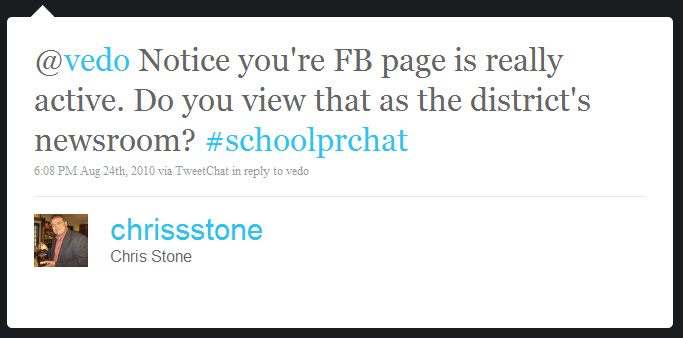
This is a great question because it forced me to pause and take a critical look about how I was using my school district's Facebook page.
A school district's Facebook page is a prime location for sharing timely, relevant, and interesting content with the community of parents, students, staff and even some random people that have decided to 'Like' the page along the way.
The strategy behind the school district using Facebook could be summed up as fish where the fish are. With so many people on the social utility, it just makes sense for school districts engage their community there.
But Facebook as a school district's newsroom? I think in the traditional sense of the term 'newsroom' perhaps not since it doesn't really provide enough to meet journalists' expectations. From distribution and content expectations of journalists, Facebook doesn't really work.
Ah, but journalists aren't the only people school PR folks are trying to reach. Certainly traditional media should (and will continue to) be a fundamental component for school district communication pros. And we should do everything we can to sharpen our media relations skills and approach.
But don't let that be the only focus.
School districts should already be leveraging Facebook for communication and community outreach. Set your district's Facebook rules of engagement, prepare and gather content from all over the district to share. Post, listen, engage and promote...and repeat.
I know some school districts don't allow you to comment on their Facebook page wall. I don't agree with this broadcast-only practice. The magic is in the feedback. When we post items to Facebook like updates, questions, links, photos, videos, student/staff recognitions, explanations, news, events, etc. it's done with the audience in mind. I use Facebook in my school district to share and engage with the community.
Oh and for the record, I recently tried to pitch a story to a local newspaper reporter only to be told, "yeah, I saw that on Facebook earlier."
Come to think of it, maybe it is the district's newsroom.
Subscribe to:
Posts (Atom)